myGov New Pishing Email

myGov New Pishing Email

eLearning Marketplace BEC LMS SMS

Try eLearning Marketplace SaaS

myGov.au

Phishing Emails – myGov Australia

I have been receiving multiple phishing and hacker emails (Phishing emails) from myGov, AusPost, and KMart.  I tried to explain how to protect yourself from pushing emails.

  1. An email with the hacker’s target website link, the website forces you to download or install free software and as a result your system control
  2. An email with porn images is redirected to the target website and the host girls ask you to allow permission from your browser, so you can view their contents but hackers received control of your system.
  3. An email with a reputed company, Government department or lottery system official email clone, to congratulate you on financial benefits if you sign up for a hacker’s target website (replica of the original website), so hackers can collect your username and password details.
      • A new myGov Pishing email from bill@au-mygov.bumimu.com is not an official myGov domain,
      • A new myGov Pishing email Begin on MyGov button link is not myGov domain. https://tsw.theloganchicagovenue.com/  
      • A new myGov Pishing email Button spelling mistake: Begin on MyGov button, the correct spelling is myGov

In today’s digital age, email has become a primary method of communication, but it also poses significant risks, particularly in the form of phishing scams. These fraudulent emails, disguised as legitimate correspondence, aim to trick recipients into divulging sensitive information such as passwords, financial details, or personal data. One common guise for such scams is emails purportedly from myGov Australia, a government service portal. This guide will outline step-by-step how to identify phishing emails and protect yourself from falling victim to them.

Check the Sender’s Email Address

Always scrutinize the sender’s email address. Phishing emails often use deceptive email addresses that resemble legitimate ones but contain slight variations or misspellings. Authentic emails from myGov Australia will typically come from an official government domain, such as @my.gov.au. Be wary of emails from domains like @mygov-australia.com or @mygovsupport.net, as these are likely phishing attempts.

Examine the Content for Spelling and Grammar Errors

Phishing emails often contain spelling and grammar mistakes, as they are usually hastily crafted. Pay close attention to the language used in the email. Official communications from myGov Australia are likely to be well-written and free of errors. If you notice any inconsistencies or awkward phrasing, proceed with caution.

Void Clicking on Suspicious Links

Phishing emails often contain links that lead to fake login pages or malware-infected websites. Hover your mouse over any links in the email (without clicking) to preview the URL. If the link appears suspicious or unrelated to myGov Australia’s official website (https://www.my.gov.au/), do not click on it. Instead, navigate to the myGov website directly by typing the URL into your browser’s address bar.

Be Cautious of Urgent Requests for Personal Information

Phishing emails often employ tactics to create a sense of urgency, such as claiming that your account is suspended or that you need to verify your identity immediately. Official organizations like myGov Australia typically do not request sensitive information via email, especially in urgent or unsolicited messages. If you receive such a request, independently verify its authenticity by contacting myGov’s official support channels.

Verify with myGov Support

If you are unsure about the legitimacy of an email claiming to be from myGov Australia, contact their support team directly to verify. Do not use any contact information provided in the suspicious email; instead, visit the official myGov website and use the contact details listed there. Report any suspicious emails to myGov’s support team so they can investigate further and alert other users if necessary.

Keep Your Software Updated and Use Security Tools

Ensure that your computer’s operating system, antivirus software, and email client are up-to-date with the latest security patches. Additionally, consider using email security tools that can detect and block phishing attempts automatically. These measures can help mitigate the risk of falling victim to phishing scams.

Final Step:

Educate Yourself and Others

Stay informed about the latest phishing techniques and share this knowledge with friends, family, and colleagues. Educating others about how to identify and avoid phishing scams can help protect them from falling prey to cybercriminals.

By following these steps and exercising vigilance when it comes to email communications, you can safeguard yourself against phishing scams claiming to be from myGov Australia or any other entity. Remember to always verify the authenticity of emails before responding or clicking on any links, and report suspicious activity to the appropriate authorities. Stay safe online!

  •  

AWS Distributed Load Balance Cloudformation Tutorial

AWS Distributed Load Balance Cloudformation Tutorial

eLearning Marketplace BEC RTO LMS SMS

AWS Distributed Load Balance Cloudformation Step-By-Step Tutorial

AWS Distributed Load Balance Cloudformation Step-By-Step Tutorial

Step 1:

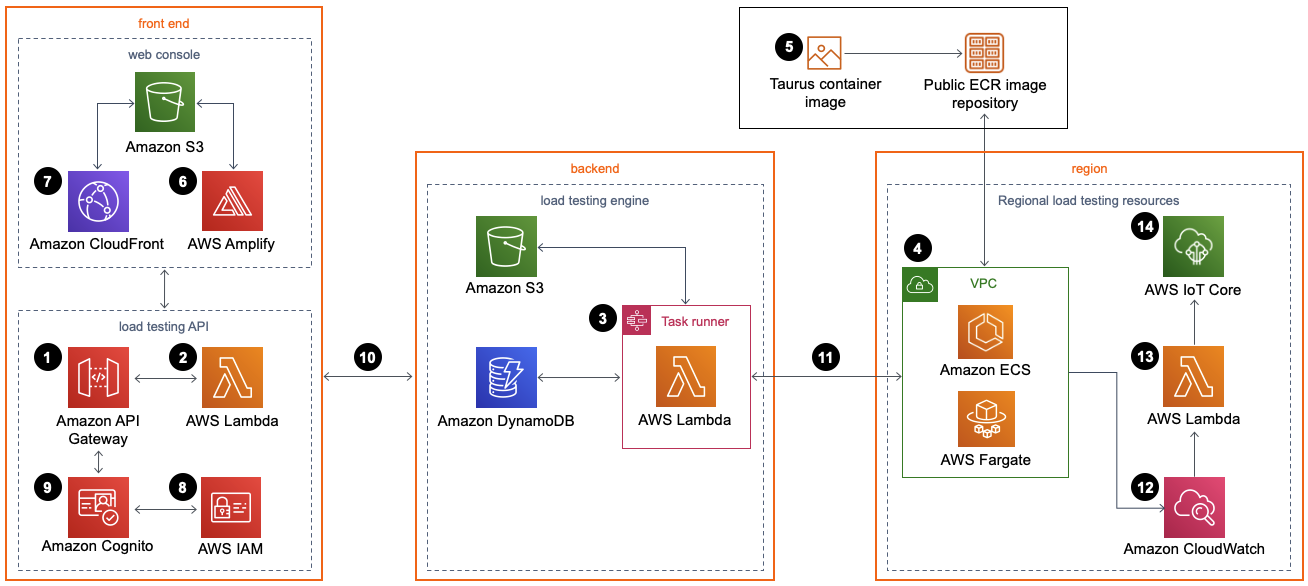
An Amazon API Gateway API invokes the solution’s microservices (AWS Lambda functions).

Step 2:

The microservices provide the business logic to manage test data and run the tests.

Step 3:

These microservices interact with Amazon Simple Storage Service (Amazon S3), Amazon DynamoDB, and AWS Step Functions to run test scenarios and provide storage for the test scenario details.

Step 4:

An Amazon Virtual Private Cloud (Amazon VPC) network topology contains the solution’s Amazon Elastic Container Service (Amazon ECS) containers running on AWS Fargate.

Step 5:

The containers include a Taurus load testing Open Container Initiative (OCI)-compliant container image which is used to generate load for testing your application’s performance. Taurus is an open-source test automation framework. The container image is hosted by AWS in an Amazon Elastic Container Registry (Amazon ECR) public repository.

Step 6

A web console powered by AWS Amplify is deployed into an S3 bucket configured for static web hosting.

Step 7

Amazon CloudFront provides secure, public access to the solution’s website bucket contents.

Step 8

During initial configuration, the solution also creates a default solution administrator role and sends an access invite to a customer-specified user email address.

Step 9

An Amazon Cognito user pool manages user access to the console and the API Gateway API.

Step 10

After you deploy this solution, you can use the web console to create a test scenario that defines a series of tasks.

Step 11

The microservices use this test scenario to run Amazon ECS on Fargate tasks in the AWS Regions specified.

Step 12

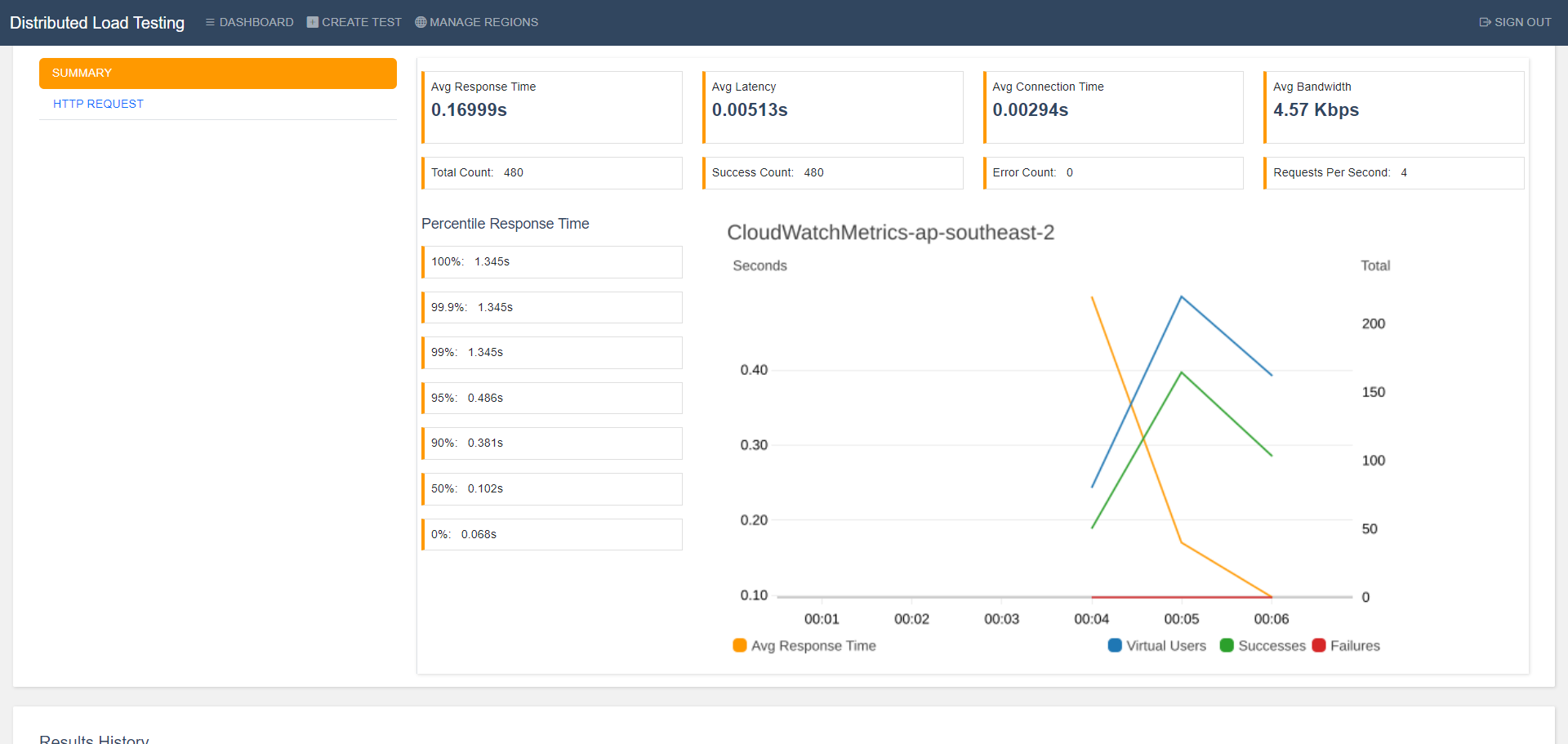
In addition to storing the results in Amazon S3 and DynamoDB, the output is logged in Amazon CloudWatch once the test is complete.

Step 13

If you select the live data option, the solution sends the CloudWatch logs for the Fargate tasks to a Lambda function during the test, for each Region in which the test was run.

Step 14:

The Lambda function then publishes the data to the corresponding topic in AWS IoT Core in the Region where the main stack was deployed. The web console subscribes to the topic, and you can see the data while the test runs in the web console.

Cloudformation Template: https://solutions-reference.s3.amazonaws.com/distributed-load-testing-on-aws/latest/distributed-load-testing-on-aws.template

Documentation:

https://docs.aws.amazon.com/pdfs/solutions/latest/distributed-load-testing-on-aws/distributed-load-testing-on-aws.pdf

Minimize image
Edit image
Delete image

Jmeter for Bigners:https://www.youtube.com/playlist?list=PLUDwpEzHYYLs33uFHeIJo-6eU92IoiMZ7

Azure B2C Integration – latest Moodle 4.3

Azure B2C Integration – latest Moodle 4.3

eLearning Marketplace BEC LMS SMS

Try eLearning Marketplace SaaS

lms.net.au

Azure B2C Integration – latest Moodle 4.3

      • Moodle 4.3 vanilla installation.
      • Install the Azure B2C plugin on Moodle
      • Azure active directory user access configuration
      • Azure B2C application creation and Branding
      • Azure B2C application Integration parameters in Moodle B2C plugin
      • Moodle web services check
      • Testing system
        • Create a new user from Azure B2C
        • Update existing users from Azure B2C login

Chiniotfuniture eCommerce Store 2004-2005

Chiniotfuniture eCommerce Store 2004-2005

eLearning Marketplace BEC LMS SMS

Try eLearning Marketplace SaaS

Chiniotfurniture.com | Beccity.com

Chiniotfuniture eCommerce Store 2004-05

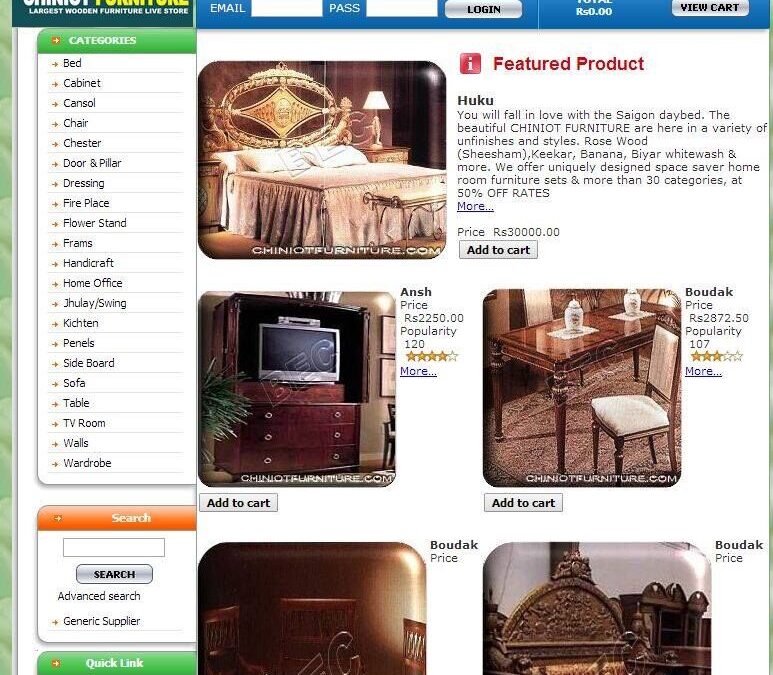
      • An image of an iconic volunteer project website 2004-2005.
      • Comersus shopping cart website development (ASP, HTML, CSS, MySQL, XAMP Server)
      • 2000+ products to promote local 400+ handmade furniture industry units
      • Design, development, optimization, testing  and cPanel management for web administration
      • Managed and administrated the store frontend and and backend office, especially for the administrator
      • Worldwide promotion of Chiniot Punjab Pakistan’s small furniture industry through websites chiniotfurniture.com and furniture.ca.tf.
      • Affiliation and registration of Chiniot furniture project with international furniture organizations and furniture fair industry-leading service providers.Chiniotfurniture.com in 2004-05
        Beccity.com – Shop what you want | Since 2016

Results:

    1. Sales boost, more mature international customers.
    2. Local businesses established international business branches worldwide
    3. Chiniot City was recognized as Funiture City officially by the Government of Pakistan.
  •  

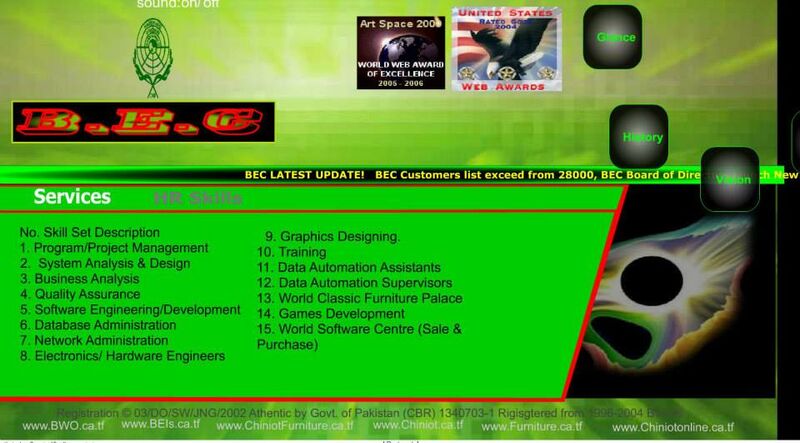
Award Winning Web Development

Award Winning Web Development

eLearning Marketplace BEC LMS SMS

Try eLearning Marketplace SaaS

BEC.ca.tf

Award Winning Web Development 2004-05

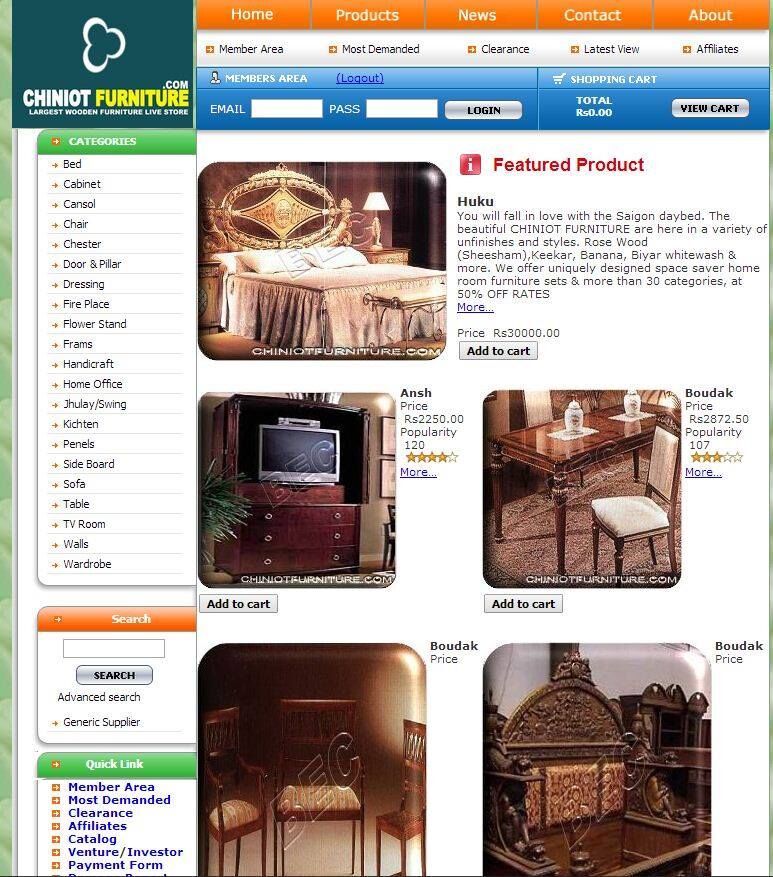
      • An image of an award-winning website 2004-2005.
      • Flash fully multimedia website development
      • 15 pages of the main website and an Introduction
      • Design, development, optimization, testing  and cPanel management for web administration
      • Total flash intro and website size 76 KB + 144 KB

AWARDS:

    1. Art Space 2000 – World Web Award of Excellence 2005-2006
    2. United States – Rated Good 2004 -Web Award
  •  

Pin It on Pinterest